2025年8月

button是一个行内块级元素
display:inline-block;

所以处理方式很简单,可以用以下两种方式:
方式一:

 <div style="text-align:center">
   <button>按钮居中</button>                     
 </div>

方式二:

<div>   
   <button  style="display:block;margin:0 auto">按钮居中</button>                      
</div>

原生button按钮css去掉默认样式

button{
    border: none;
    margin: 0;
    padding: 0;
    outline: none;
    border-radius: 0;
    background-color: transparent;
    line-height: normal;
}
button::after {
   border: none;
}

jq get(0)问题
注:这里所说的get不是ajax里的get。
get(): 将jq获取的元素转成js原生的元素
问题:为什么在用get的时候,哪怕只有一个元素,都需要写参数0?

<!DOCTYPE html>
<html lang="en">
<head>
    <meta charset="UTF-8">
    <meta name="viewport" content="width=device-width, initial-scale=1.0">
    <meta http-equiv="X-UA-Compatible" content="ie=edge">
    <title>Document</title>
    <style>
        div {
            width: 100px;
            height: 100px;
            background: black;
            margin: 0 auto;
        }
    </style>
    <script src="./jquery-3.4.1.js"></script>
</head>
<body>
    <div></div>
    <script>
        //jq中的get问题 这里所说的get不是ajax里的get
        //get() 将jq获取的元素转成js原生的元素
        //问题:为什么在用get的时候,需要写参数0 
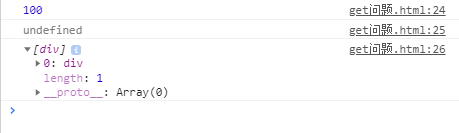
        console.log($('div').get(0).offsetWidth) //100
        console.log($('div').get().offsetWidth) //undefined
        //我们可以将$('div').get() 输出一下看看
        console.log($('div').get()); //div的数组
    </script>
</body>
</html>

请输入图片描述
从上面的结果可以看出,get之后返回的是一个数组,哪怕他只有一个元素,所以我们在写get的时候需要加参数0.

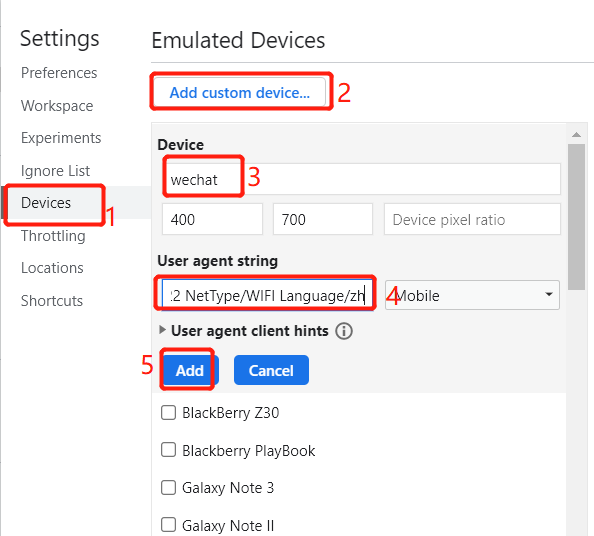
1、点击F12或者右键审查元素进入开发者模式
2、点击右上角的设置图标进入设置
或者选择手机模式,然后点击Responsive展开下拉框,选择最下面的Edit...按钮,打开Devices设置页面
3、然后进入Devices,选择具体步骤如下图:
请输入图片描述
数字3那里是为这个设备起的名字

把下面这段代码加入 数字4的位置

Mozilla/5.0 (Linux; Android 7.0; MI 5s Build/NRD90M; wv) AppleWebKit/537.36 (KHTML, like Gecko) Version/4.0 Chrome/64.0.3282.137 Mobile Safari/537.36 wxwork/2.4.16 MicroMessenger/6.3.22 NetType/WIFI Language/zh

4、完成后再次点击Responsive展开下拉框,你将会看到你刚刚新建的设备,选择后刷新便可

js实现。

1、借助一个新页面跳转到目标地址。

<html>
<head>
    <meta charset="utf-8">
    <style type="text/css" media="screen">
        iframe{
            display: none;
        }
    </style>
<body onLoad="open_without_referrer()">
<script>
function open_without_referrer(){
    var link = encodeURI('{$url}');//url为跳转链接
    document.body.appendChild(document.createElement('iframe')).src='javascript:"<script>top.location.replace(\''+link+'\')<\/script>"';
}
</script>
</body>
</html>

2,直接跳转到目标地址,在原窗口打开。

function openWithoutReferrer(url){
    document.body.appendChild(document.createElement('iframe')).src='javascript:"<script>top.location.replace(\''+url+'\')<\/script>"';
}

3,直接跳转到目标地址,在新窗口打开。

function openWithoutReferrer(url){
     window.open('javascript:window.name;', '<script>location.replace("'+url+'")<\/script>');
}

如果要避免各种原因出现的缓存导致错误,我们在跳转时候加入当前时间。

function openWithoutReferrer(url){
    var oDate = new Date();
    window.open('javascript:window.name', '<script>location.replace("'+url+'")<\/script>'+oDate.getTime());
}